A Smart Speaker Should Know Who Is Asking Before It Acts
Voice recognition can personalize a shared assistant, but it is weak security. This household test shows where profiles help and where a screen or PIN should remain mandatory.
October 25, 2026 · 8 min read
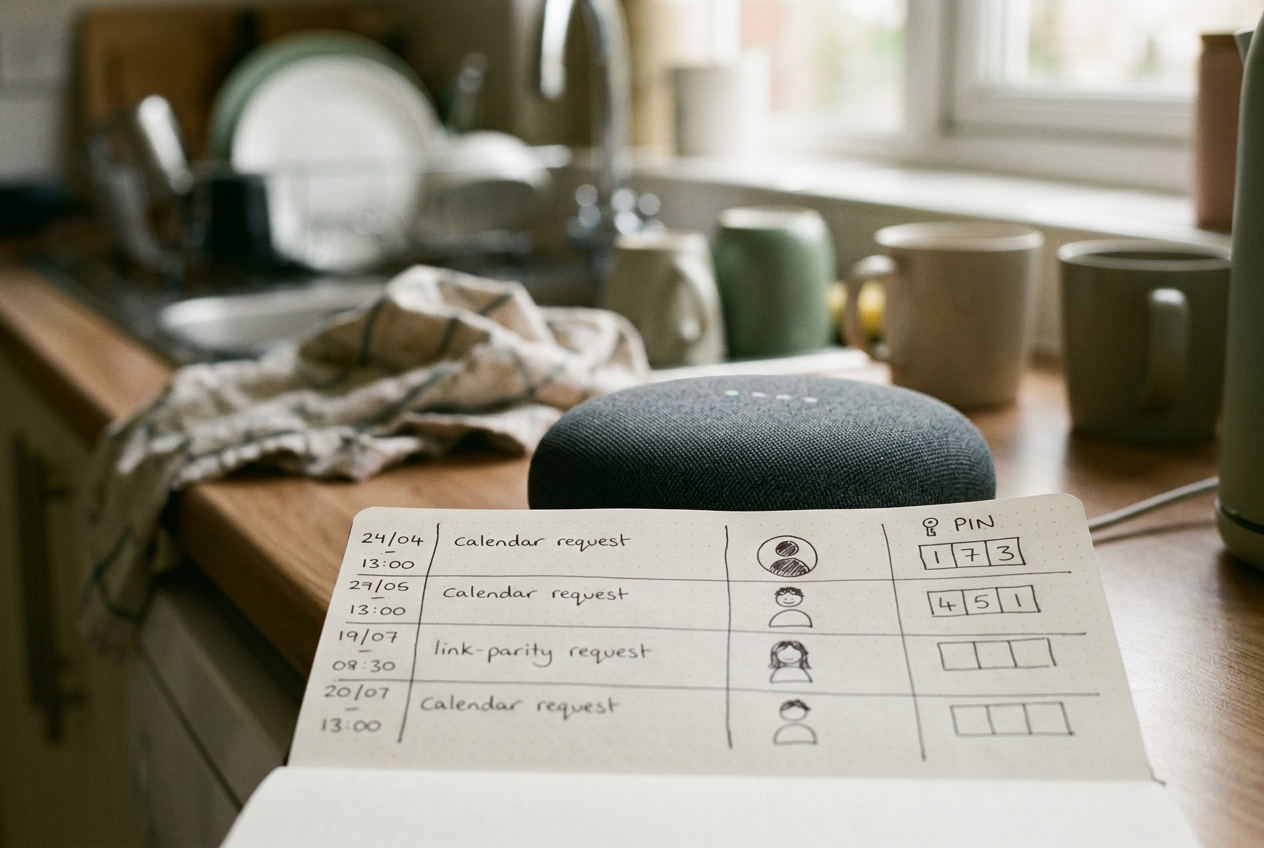
The useful test starts with one ordinary sentence spoken to the kitchen speaker: “What’s on my calendar?” If the assistant gives the right adult the right schedule, refuses or limits the same request from a child, and handles an unrecognized visitor without exposing either account, its household profiles are doing useful work.
That still does not make the speaker an identity system.
Voice matching compares speech with a stored voice model, a mathematical representation of vocal characteristics. It can help an assistant choose a calendar, music history, or set of preferences, but background noise, illness, similar voices, recordings, and changes in speaking style can all weaken the match. Generative AI adds another complication because the assistant may draw on conversation history or saved preferences even when the underlying account boundary is unclear.
The setup therefore needs two layers. Profiles decide whose information the assistant should use. Approval controls decide whether the assistant may act.
Set up profiles before testing features
Do not begin by asking the speaker to recognize everyone from a single household account. Each adult should use an individual account linked through the platform’s household or family system, while children should use managed profiles where the platform offers them. A shared login makes separation difficult by design because calendars, history, contacts, and purchases may all point to the same owner.
In the assistant’s app, look for settings labeled voice recognition, voice match, personal results, household, family, or profiles. Names differ among Amazon Alexa, Google Assistant or Gemini-based experiences, and Apple’s Siri and Home systems, and they may change as generative features arrive. The important mechanism is consistent: each person enrolls their voice, links only their own services, and chooses which personal results the speaker can say aloud.
Use this order:
- Remove old or duplicate voice profiles, especially profiles trained years ago or attached to an account nobody now uses.
- Give each adult a separate platform account, then connect that person’s calendar, contacts, music service, and other personal tools from their own phone.
- Create managed child profiles where available. Disable purchasing and personal communication by default rather than relying on the assistant to infer that a young voice belongs to a child.
- Complete voice enrollment in a quiet room while standing at the distance normally used with the speaker. Do not have another household member answer prompts or hold the phone.
- Review personal-results settings by device. A bedroom display and a kitchen speaker should not automatically receive identical access merely because they share a home.
- Turn on purchase confirmation, a voice PIN, or checkout approval in the app. If the platform cannot require one of those controls, disable voice purchasing.
Enrollment is not the end of the job. It creates the conditions for a test.
Run the kitchen-speaker identity test
Make a paper or digital scorecard with one row per household member and a separate row for an unrecognized guest. Do not use real purchases or sensitive medical details. A spare calendar containing harmless entries, a test contact, and an empty shopping list are enough to expose most routing problems without creating a cleanup job.
Start again with “What’s on my calendar?” Ask from the position normally used in the kitchen, then repeat from farther away and with ordinary household noise present. Record whether the speaker selected the right account, asked who was speaking, returned generic information, or exposed another person’s entry. A confident wrong answer is worse than a refusal because the household may not notice the account switch.
Next, have a second adult use the identical wording. This checks whether the assistant routes requests by voice rather than defaulting to the device owner. Repeat the request in a tired voice or with a mild change in volume. There is no need to imitate another person; the test is whether normal variation causes the assistant to lose its boundary.
Run the same calendar request through a child profile. A child may reasonably hear school or family events assigned to that profile, but the speaker should not read an adult’s private calendar merely because both people belong to the same household. If the product lacks granular calendar controls, turn off spoken personal results on shared devices and use a phone or display for calendar access.
Finally, ask an unenrolled adult to try. The acceptable outcomes are a generic response, a request to identify the speaker followed by verification, or a refusal to provide personal data. Defaulting to the primary account fails the test.
Return to that sentence after any profile change. “What’s on my calendar?” is a compact regression test, meaning a repeated check that confirms an update has not broken behavior that previously worked.
Test requests that can create consequences
Calendar separation shows whether data is routed correctly. Purchases and messages show whether the assistant understands the difference between recognizing someone and authorizing them.
With voice purchasing disabled or pointed only at a harmless list, ask each profile to add an item. Adding “batteries” to a shared list may be acceptable for adults and children because another person reviews it later. Moving from the list to checkout should trigger an approval step that does not depend only on voice matching.
Then test a communication request using a designated test contact. The speaker should identify the sender, repeat the recipient, and offer a chance to review the content. Generative rewriting can make a message sound smoother, but it also creates a risk that the final wording differs from what the speaker intended; anything personal, ambiguous, or consequential belongs on a screen before transmission.
Children need a separate pass. Ask for an age-inappropriate topic, a product purchase, and access to an adult’s stored information, one at a time. The point is not to grade the language model’s general knowledge. It is to verify that the child profile remains active throughout a conversation, including after follow-up requests that omit names or account details.
That last case matters with generative assistants. A model may carry context from one turn to the next, so a correctly blocked first request does not prove that a rephrased follow-up will stay blocked. End the conversation, switch speakers, and test again rather than assuming the assistant noticed who entered the room.
Keep these actions behind a screen or PIN
Voice can be a convenient selector. Authentication, which verifies that a person is allowed to perform an action, needs a stronger signal when money, privacy, or physical access is involved.
Require a screen confirmation, app approval, or secret PIN for:
- Completing a purchase, changing a delivery address, starting a paid subscription, or approving a tip.
- Sending a message, posting content, or placing a call where the recipient or wording could cause harm.
- Unlocking a door, opening a garage, disabling an alarm, or changing another security control.
- Showing camera feeds, reading private messages, or speaking calendar details that reveal health, travel, or location information.
- Adding household members, retraining a voice profile, changing parental controls, or linking a new account.
- Deleting recordings, conversation history, calendars, contacts, or other data that may be difficult to restore.
A PIN spoken aloud is weaker than an approval on a personal phone, especially in a busy room. It can still block accidental orders and casual misuse, but it should not protect the front door or an account takeover path. For those actions, use the platform’s app, device unlock, or another possession-based check.
The extra step costs time and removes some of the convenience that makes a speaker appealing. That is the tradeoff. A request to play music can tolerate a mistaken profile; an order or door command cannot.
Check memory separately from voice recognition
Generative assistants may keep preferences, summaries, or conversation history beyond the immediate exchange. Those memory controls can sit in a different menu from voice profiles, and a successful voice match does not prove that stored context is separated per person.
Open each household account in turn and inspect activity, saved information, connected services, and personalization settings. Look for one adult’s prompts appearing in another person’s history, recommendations shaped by a child’s requests, or a shared device retaining context after speakers change. Delete the test conversations, then confirm from the other profiles that they disappeared only where expected.
If the platform offers one shared memory for the home, treat it as communal. Do not place private details there. A household note such as a grocery preference is a sensible use; an account password, medical detail, or surprise purchase is not.
Repeat the kitchen calendar request after reviewing memory controls, after adding a new family member, and after major assistant updates. Profiles drift as services are relinked and devices are replaced. A two-minute check is more useful than assuming the enrollment screen still describes current behavior.
Decide whether the speaker passes
A pass does not require flawless recognition. It requires safe failure: the assistant should withhold personal information or request stronger approval when it is uncertain, rather than silently falling back to the owner’s account.
Keep the device on shared-room duties if it confuses adults, gives a child access to adult results, or lets an unknown speaker reach checkout. Music, timers, weather, shared lists, and general questions still work without broad personal access. The alternative is not necessarily a new speaker. It is often a narrower configuration.
The kitchen test ends where it began. If “What’s on my calendar?” produces the wrong person’s schedule even once under ordinary conditions, disable spoken calendar results on that shared device and move the request to a phone or authenticated display.
Questions people ask
Can a smart speaker identify every family member by voice?
No. Voice matching can select among enrolled profiles, but it remains probabilistic and may fail with noise, illness, similar family voices, or recordings. Configure unknown or uncertain matches to receive generic results, then use a phone, screen, or PIN before revealing personal data or taking consequential action.
Should children have separate smart speaker profiles?
Yes, where the platform supports managed child profiles. A separate profile can limit personal results, purchasing, communication, and content, but parents should test follow-up prompts as well as first requests because a generative assistant may carry conversational context forward after the speaker changes.
Is a voice
PIN enough for purchases and smart locks?
A voice PIN is useful for blocking accidental purchases, though anyone nearby may hear it. Prefer approval on a personal device for purchases, account changes, and access to private records; smart locks, alarms, and garage controls should use the strongest confirmation the platform supports rather than voice recognition alone.
How often should household voice profiles be tested?
Test after enrollment, when a person or connected account changes, and after a substantial assistant update. Repeating the same harmless calendar, message, and shopping-list checks makes changes visible, while an unknown-speaker test confirms that the device still fails closed instead of exposing the owner’s account.
One story a day
The story of the day, in your inbox
One real story about AI each morning — no hype, no alarm, just company for the road.