Your AI Laptop’s NPU May Sit Idle While Apps Use the GPU
An NPU can run supported AI models efficiently, but the laptop badge proves little about your software. Test the exact app, model, and battery workload before paying extra.
September 5, 2026 · 7 min read
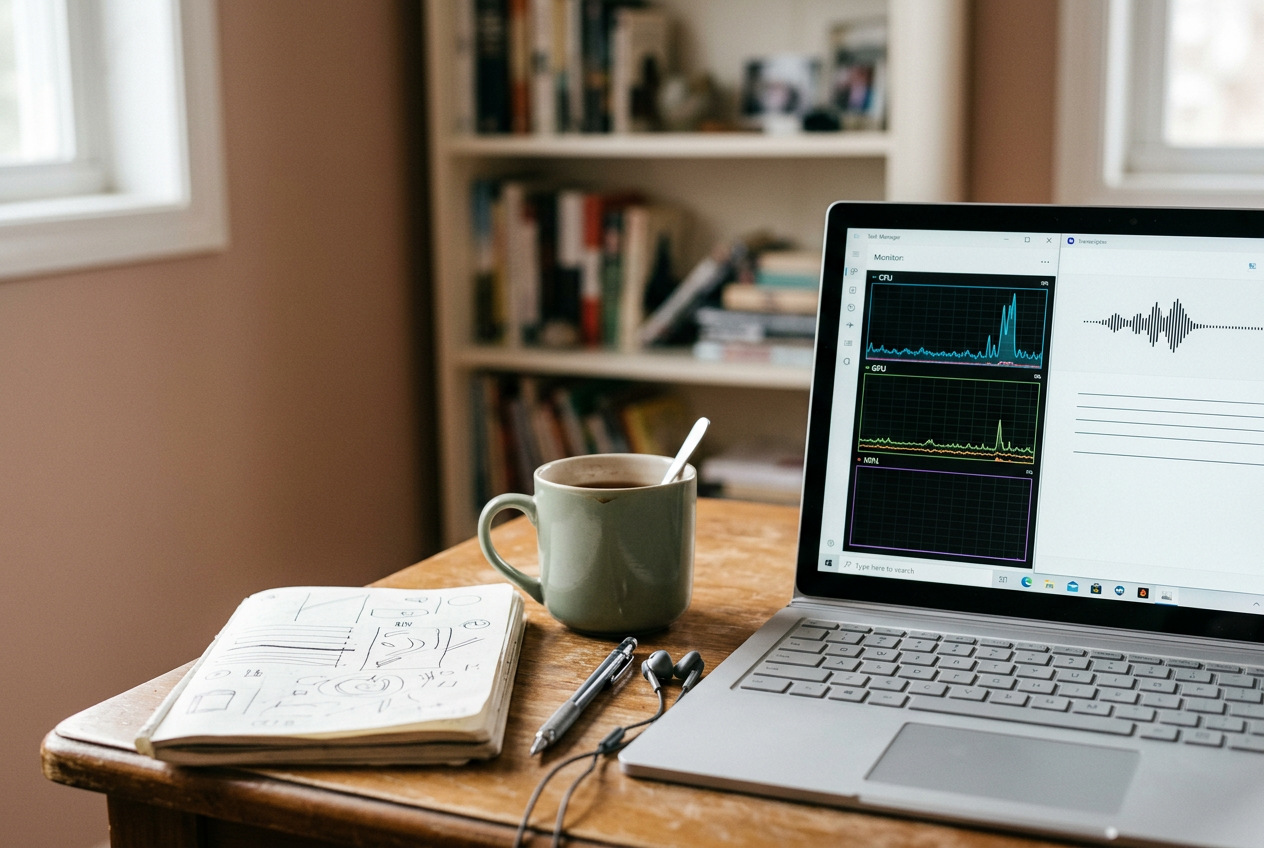
The test on my desk starts with one saved, ten-minute meeting recording. I run that same audio file through the transcription app I expect to use, watch Windows Task Manager, disconnect the network when the app permits it, and repeat the job on battery power.
That modest workflow reveals more than an AI PC sticker. A neural processing unit, or NPU, is a low-power processor designed to execute supported machine-learning operations. It cannot take arbitrary AI work away from the central processing unit, or CPU, and graphics processing unit, or GPU. The application has to target the NPU, its model has to fit, and every important operation needs a compatible execution path.
Miss one of those conditions and the app may use the GPU, split work across processors, or send the recording to a cloud server. The feature can still work. It may even work quickly. The NPU badge has not proved its value.
Start with the app, not the processor specification
Before opening a performance monitor, identify one repeatable task that matters to you. A local transcription is useful because it has a fixed input and an obvious output, but the same method works for background removal, image generation, webcam effects, noise suppression, or a local language model.
Use the exact application and feature you plan to keep. “AI acceleration” in a product page is too broad. One app might use the NPU for webcam framing while sending transcription to the cloud; another could run a small speech model locally but move a larger model to the GPU. Support can also differ between Intel, AMD, and Qualcomm laptops even when each machine advertises an NPU.
Look for documentation that names the processor family or the software interface used to reach it. An execution provider is the software layer that sends compatible model operations to a particular processor. Apps built with frameworks such as ONNX Runtime may expose an NPU provider, while others rely on Microsoft or chip-vendor tools. A generic claim of “on-device AI” does not identify the processor doing the work.
Model size is only part of compatibility. The NPU also has to support the model’s operators, which are the individual mathematical operations in its computation graph, along with the numerical format used for its weights. A model prepared for lower-precision arithmetic may fit an NPU well; an unsupported operator can force one section onto the CPU or GPU. Some runtimes partition the model between chips.
Others reject the NPU path and move the entire job.
For the meeting recording, I would want the app developer to confirm local transcription on the exact processor family, rather than merely saying the laptop is supported. If that confirmation is absent, treat NPU use as unverified until the machine shows it.
Watch the recording move through the machine
Install current Windows updates, the laptop maker’s drivers, and the intended app before testing. Driver changes can add model support or alter fallback behavior, so a shop-floor demonstration unit with old software is weak evidence either way.
Open Task Manager and select the Performance page. On a supported Windows laptop with the correct driver, the NPU should appear as its own processor graph. Keep the CPU and GPU graphs visible too. Task Manager is useful for direction, although it may not attribute every short NPU burst cleanly to one process, and some drivers expose more detail than others.
Now run the ten-minute recording from beginning to end. Note the start and completion time, whether the app says the model is local, and which processor graphs become active. Ignore a single spike at launch. Model loading, interface rendering, audio decoding, and file writing can wake the CPU or GPU even when inference runs on the NPU.
The important pattern appears during the sustained transcription phase. Repeated NPU activity that rises and falls with the job is evidence of use. A busy GPU with a flat NPU graph suggests a GPU path. Heavy CPU load may mean the model lacks an accelerated backend, though preprocessing can also account for some CPU work.
Low NPU utilization does not automatically mean failure. Inference may arrive in short bursts, and a small model can finish each chunk before Task Manager’s graph makes the activity look substantial. Conversely, a high NPU percentage says the chip is occupied, not that the app is faster or more efficient than its alternative.
If the application has a diagnostics page, log file, or backend selector, use it. A line naming the active execution provider is stronger evidence than the product badge and easier to save for later comparison. Developer-oriented vendor profilers can provide deeper operator-level traces, but buyers should not need one merely to establish that a promoted consumer feature reaches the advertised chip.
Repeat the recording once. The second run may be faster because the model is already loaded or compiled, which is useful in daily use but should not be confused with a different processor taking over. Record both runs rather than keeping the better result.
Separate local processing from a cloud round trip
Network behavior matters because a nearly idle NPU might be entirely appropriate when a remote server performs the transcription. Sign in, download any required model, and confirm the app is ready. Then disconnect Wi-Fi and Ethernet before submitting the saved recording.
If transcription still completes, the core job can run locally. If it stops, the feature may depend on the cloud, although a failed license check or missing model download can produce the same symptom. Reconnect and watch Windows Resource Monitor or the app’s network activity during another run. Continuous upload followed by downloaded text is stronger evidence of remote processing than a brief account check.
Local does not necessarily mean NPU. Return to Task Manager during the offline run and watch the same recording again. The app may be private and self-contained while using the GPU, which can be a reasonable choice on a plugged-in performance laptop. It just does not establish the battery case for paying more for an NPU.
Measure energy with the workload you will repeat
NPU specifications often quote trillions of operations per second, but that peak figure does not tell you how much battery a particular app saves. The model may use only part of the chip, and preprocessing or memory transfers can dominate a short job.
For a practical battery check, charge each candidate laptop to the same displayed level, unplug it, set the same screen brightness and power mode, then close launchers and synchronization tools that can wake in the background. Run the meeting recording several times in succession and note the battery percentage before and after the batch. A single run is usually too small for the coarse battery gauge to resolve reliably.
Keep the output settings fixed. Changing transcription quality, language detection, speaker separation, or model size changes the work and invalidates the comparison. Let each laptop cool and settle before another batch because temperature can alter clock speeds and fan behavior.
Windows battery reports and per-app energy estimates can add context, but neither is a laboratory power meter. They are most useful for spotting a large, repeatable difference. If the app offers a backend choice, compare its NPU mode with the GPU or CPU mode on the same laptop. That controls for the display, battery capacity, and much of the surrounding hardware.
Without a selectable backend, compare complete systems rather than claiming the NPU caused the result. A laptop with a larger battery, dimmer panel, or more efficient CPU can last longer even while its NPU does nothing. Wall-clock completion time belongs beside battery drain too: a GPU that finishes much sooner may return to idle quickly enough to narrow the energy gap.
Turn the result into a buying decision
The NPU earns weight in the purchase decision when the exact application identifies a supported backend, the processor graph or logs confirm repeated use, and the battery test shows a meaningful advantage for work you do away from an outlet. Save screenshots and the app version alongside your notes because later updates can change the route.
It is harder to justify paying extra when your main AI tools run in a browser, depend on cloud models, or keep the laptop plugged in beside a capable GPU. Future compatibility is possible, but it is not a current benefit. Buy for the meeting recording that completes efficiently on the machine today, not for a sticker that promises software may catch up later.
Questions people ask
Does
Windows Task Manager prove an app uses the NPU?
It provides useful evidence when NPU activity tracks the sustained part of a repeatable workload, especially if CPU and GPU behavior changes at the same time. It may miss brief bursts or lack clear process attribution, so an app log naming the active execution provider is stronger confirmation.
Can an app use the NPU and GPU at the same time?
Yes. A runtime can place supported model operations on the NPU while leaving unsupported operations, preprocessing, or display work on the GPU or CPU. Mixed activity is not automatically a problem, but it makes the app’s logs and a controlled battery comparison more important.
Does offline AI always run on the NPU?
No. Offline only establishes that the core processing stays on the laptop. The application may run its model on the CPU or GPU, and it can still contact a server for licensing or updates without sending the input there.
How much NPU activity is enough?
There is no universal percentage because models submit work in different batch sizes and Task Manager samples activity over time. Look for repeatable NPU use that follows the workload, then judge the outcome through completion time and battery drain rather than treating utilization as the final score.
One story a day
The story of the day, in your inbox
One real story about AI each morning — no hype, no alarm, just company for the road.