When Your Laptop Can Replace Paid Transcription
Run one 60-minute recording locally before canceling a transcription subscription. Processing speed matters, but speaker labels, language support, battery use, and privacy usually decide the result.
August 9, 2026 · 8 min read
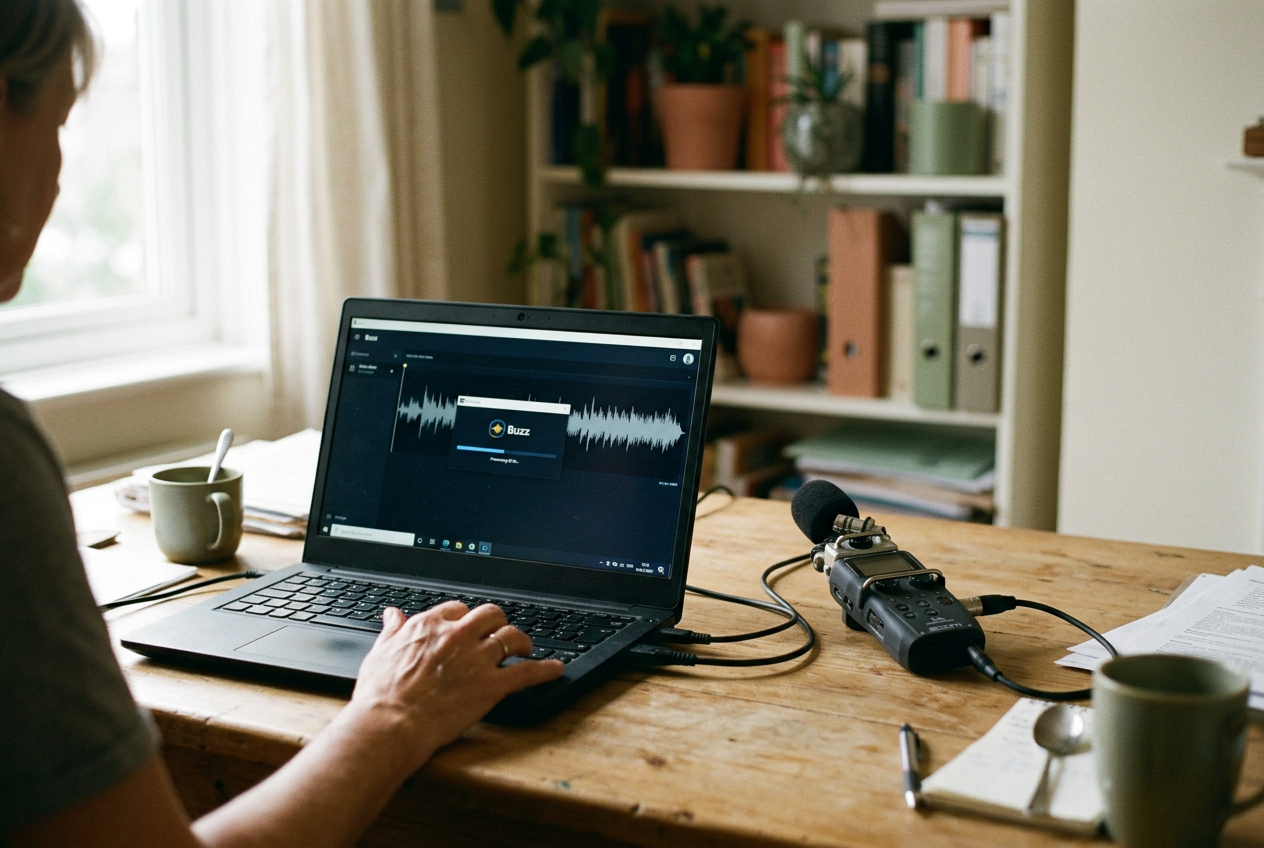
The useful test is sitting on my desk: a 60-minute, three-speaker meeting, recorded as a WAV file and transcribed on an RTX-equipped Windows laptop using Buzz, a desktop app that can run OpenAI's Whisper speech-recognition models locally. The same file can go through a paid upload service, which makes the comparison less about model marketing and more about elapsed time, corrections, battery drain, and where the recording travels.
That last point changes the calculation. Local speech recognition can keep the audio on the laptop, remove a recurring fee, and work without an internet connection. It can also consume most of an afternoon during setup, quietly fall back to the central processing unit, and deliver a wall of text with no reliable indication of who said what.
The laptop replaces the service only when its full workflow wins. Raw transcription speed is one part of that workflow, not the verdict.
Start with the hardware path
Whisper is a model family that converts speech into text, and several desktop applications can run compatible versions without uploading the recording. Buzz is one accessible option for Windows, macOS, and Linux. Other interfaces use whisper.cpp or faster-whisper, two local implementations optimized for consumer computers.
Install the application from its official source, download a multilingual model if the recording is not exclusively English, and confirm where the model files will be stored. The first download is setup time, not transcription time, but it still counts if this is a one-off job.
Next, identify the processor doing the work. A GPU, or graphics processing unit, handles many model calculations in parallel and has broad support in local transcription tools. An NPU, or neural processing unit, is a lower-power accelerator built for AI workloads, but owning one does not mean the application uses it.
This is the first practical trap. An app may advertise local AI while running entirely on the CPU because its inference engine, the software that executes the model, lacks support for that laptop's NPU. Look for a named hardware backend in the application's settings or log. On Windows, Task Manager can provide a second check: watch the CPU, GPU, and NPU graphs during transcription rather than trusting the laptop's badge.
For the meeting file on my desk, the GPU route is the baseline because Whisper applications commonly support it. An NPU run belongs in the comparison only if the app explicitly selects that accelerator. Otherwise, an NPU-versus-cloud claim is measuring the wrong thing.
Time the whole job, not the progress bar
Keep setup and repeated use separate. Record how long it takes to install the application, fetch the model, find the hardware setting, and produce the first usable transcript. Divide that setup time by the number of recordings you realistically expect to process; a lengthy installation spread across weekly meetings is tolerable, while the same work for one interview is not.
Then start a second stopwatch when you press the transcription button. Stop it when editable text appears, including any export step. For the paid service, start before the upload and stop at the same point. A fast cloud model can still leave the user waiting for a large file to cross a slow connection.
Use real-time factor to compare machines and recordings. This is processing time divided by audio duration: a result below 1 means the transcript finished faster than the recording would play, while a result above 1 means an hour of audio takes more than an hour to process. Report the factor alongside the model size and hardware backend, since a bare claim of “fast” says little.
Run the 60-minute meeting twice after the model has downloaded. The first pass can include startup work or model loading that later runs avoid. Keep the laptop plugged in for the speed test, close games and video editors, and do not compare a local run under heavy load with an idle cloud run.
The threshold is practical rather than universal. If local processing finishes before you would normally return to edit the transcript, extra waiting has no daily cost. If interviews arrive minutes before publication or colleagues expect a shared document immediately, even faster-than-real-time processing may lose to a service that combines transcription, speaker labeling, and delivery in one step.
Measure corrections on the difficult five minutes
Do not proofread an entire hour to compare quality. Select five minutes containing the conditions that usually break speech recognition: overlapping speakers, a proper name, a number, background noise, and one sentence where a missing “not” would reverse the meaning. Transcribe that slice locally and through the paid service, then correct both against the audio.
Word error rate, the share of words deleted, inserted, or replaced, is useful for formal testing but can hide the mistakes that cost the most time. A misspelled filler word matters less than a wrong dosage, product name, dollar amount, or negation. Count substantive corrections separately and note how long the edit takes.
The three-speaker meeting exposes another distinction. Plain Whisper output transcribes speech but does not inherently provide dependable diarization, which is the assignment of words to individual speakers. Some local applications add a separate diarization model, though that increases setup, processing demand, and the chance that a short interruption gets assigned to the wrong person.
Paid services often make speaker labeling easier to review because their editing interfaces connect text to the waveform and let a user rename speakers. If the local transcript saves processing money but adds repeated searches through the audio, it has not replaced the service. It has moved the bill into editing time.
Use the same test for punctuation and paragraph breaks. These affect readability, although they are usually cheaper to fix than names or speaker changes. For my 60-minute file, the decisive column is not total typo count. It is minutes spent turning the output into something another person can use.
Check the language before trusting the model label
A model described as multilingual may recognize many languages without handling each one equally well. Test the language, accent, and code-switching pattern in the actual recording rather than treating a supported-language list as an accuracy guarantee.
Run a short excerpt with automatic language detection, then repeat it with the correct language selected manually. Detection can fail when an introduction is brief, music precedes the speech, or speakers switch languages. Manual selection removes one source of error, but it will not solve a model that has weak coverage of the vocabulary.
Translation also needs a separate decision. Some Whisper workflows translate supported speech into English instead of producing text in the original language. That can be useful for review, yet it is not a faithful substitute when names, quotations, or exact wording matter. Keep the source-language transcript when the application allows it.
If the paid service consistently handles a required language better, local transcription is not ready for that workflow, regardless of how quickly the GPU finishes.
Run the battery test away from the charger
Speed testing favors the GPU. Mobile use may not.
Charge the laptop to a repeatable level, unplug it, and transcribe the same 60-minute file with the screen brightness fixed. Record the battery percentage before and after, the processing time, and which processor stayed active. Report battery percentage points used per source-hour of audio, while retaining the elapsed processing time so readers can see whether the laptop burned energy quickly or remained busy for longer.
Repeat with the NPU only when the software confirms NPU execution. An NPU is designed for efficient AI work, but model conversion, unsupported operations, or mixed CPU processing can erase the expected advantage. The quietest run is not automatically the most efficient one either; thermal limits may reduce speed while extending the period of elevated power use.
Battery drain matters differently on the desk and on a train. A plugged-in laptop can process a folder overnight. A machine needed for the rest of a workday may make cloud transcription the less disruptive option, even if the local run costs no subscription fee.
Verify what “local” excludes
Download the model first, disconnect the laptop from the network, and run the meeting file again. If transcription completes and the exported text opens, the core recognition step can work offline. That is stronger evidence than a privacy toggle with an unclear label.
Offline transcription does not guarantee that every related feature stays local. Summaries, title generation, translation, crash reporting, and account synchronization may use separate services. Inspect each feature before enabling it, and save recordings plus transcripts outside folders automatically synchronized to cloud storage if the policy requires the files to remain on the device.
Also check temporary files, deletion behavior, full-disk encryption, and backups. Local processing reduces exposure during upload and third-party storage, but it does not protect an unlocked laptop or a transcript copied into another cloud tool five minutes later. Recording-consent rules still apply; keeping a file local does not remove them.
For the meeting on my desk, airplane mode is the clean test. If the app refuses to work, requests an account, or loses an essential editing feature, that limitation belongs in the decision alongside accuracy and speed.
Make the replacement decision
Keep the local setup when it processes recurring recordings within your normal editing window, supports the required language, survives the five-minute correction test, and meets the organization's rule for offline handling. The financial case improves with repetition because the model download and setup happen once, while per-minute service charges recur.
Keep the paid service when dependable speaker labels, rapid sharing, mobile battery life, or stronger language performance saves more time than the subscription costs. A hybrid is often less tidy but more defensible: local transcription for sensitive one-speaker recordings, with the service retained for collaborative meetings and difficult multilingual audio.
The 60-minute file is enough to decide. Write down setup minutes, real-time factor, correction minutes, battery percentage points, and whether the network was required. If the local column wins on the constraints that affect your work, canceling the service is reasonable. If it wins only on model cost, keep testing.
Questions people ask
Can a laptop NPU run Whisper transcription?
Only when the transcription application and its inference engine support that NPU. Check the selected backend and watch processor activity during a run. If CPU or GPU utilization rises while the NPU remains idle, the model is not using the accelerator, regardless of how the laptop is marketed.
Is local transcription more private than an upload service?
It can be, because the audio need not leave the laptop for recognition. Verify this by downloading the model, disconnecting the network, and completing a transcript offline. Cloud-synced folders, optional summaries, telemetry, and backups can still transmit recordings or text, so “local” should describe the entire workflow rather than one model step.
How large a model should I use?
Start with a model that fits comfortably in available memory and completes the 60-minute test within your editing window. Larger models may improve recognition, especially on difficult audio or less common languages, but they demand more storage, memory, power, and processing time. Choose from correction results, not the model name alone.
Can local transcription identify different speakers?
The base speech-recognition model produces text, not dependable speaker identities. A separate diarization model can assign segments to speakers, but overlapping speech and brief interruptions remain difficult. If named speaker labels are central to the final document, compare the full editing workload with a paid service before replacing it.
One story a day
The story of the day, in your inbox
One real story about AI each morning — no hype, no alarm, just company for the road.